WorldCapture
macOS 上的截图、录屏和图上翻译工具。译文直接贴回原位,全部在你的 Mac 上完成。
macOS 15 或更高 · Apple 芯片与 Intel 通用 · 已签名并公证 · 15 MB · 免费、MIT 开源
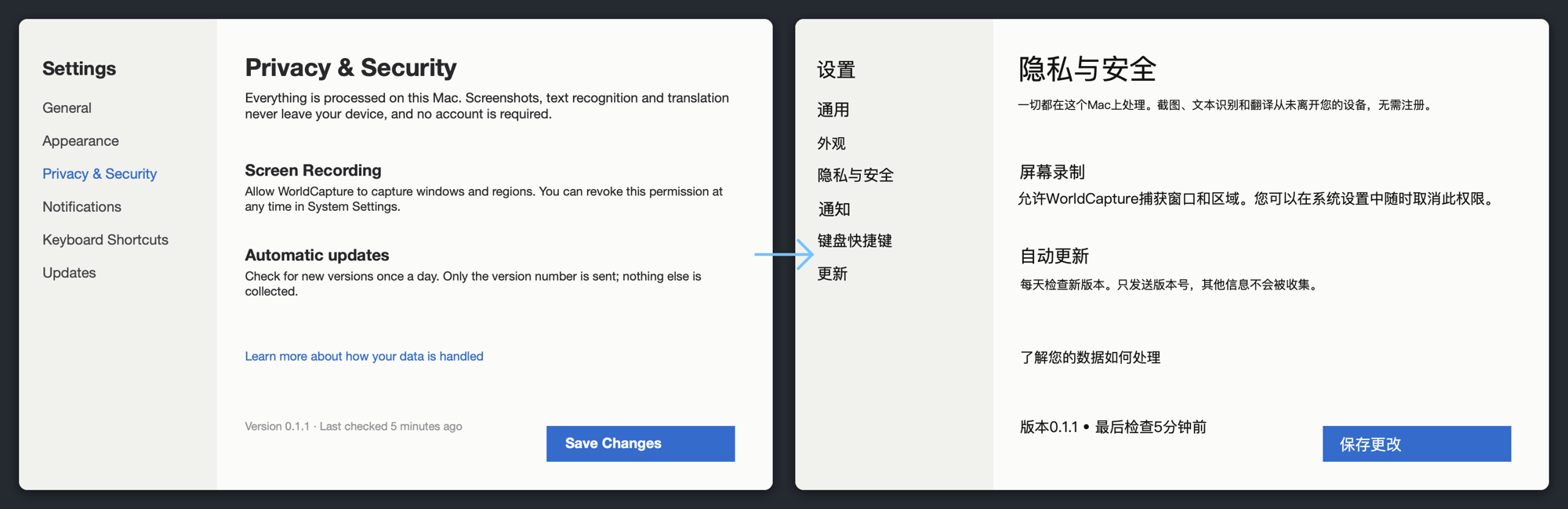
翻译前 → 翻译后。译文按原文的位置、字号和底色贴回,每一块都能再编辑。
它能做什么
- 翻译图片 — 识别截图里的文字,按段落翻译,把译文贴回原来的位置。
- 翻译镜 — 框选屏幕一块区域,字幕、弹幕、会刷新的界面持续翻译,原位覆盖,点击穿透。
- 提取文字 — 本地 OCR,原文|译文两栏,可选目标语言。
- 截图与录屏 — 区域、全屏、窗口、滚动长图;屏幕 / 区域 / 窗口录制,系统声音与麦克风,GIF。
- 标注与钉屏 — 矩形、箭头、文字、序号、马赛克、自由笔、裁切;钉屏可点击穿透;历史库。
- 翻译引擎 — Apple 智能(端上大模型)或系统翻译,都不联网;内置界面术语表,可加自己的词条。
原则
全部本机 — 截图、录屏、文字识别、翻译都不离开这台 Mac。
无追踪 — 无账号、无埋点、无广告、无水印。唯一的联网行为是可选的更新检查。
开源可审计 — MIT 许可,源码公开,这些承诺你都能自己核实。
WorldCapture
Screenshots, screen recording and in-place image translation for macOS. Translations land right over the original text, and everything stays on your Mac.
macOS 15 or later · Apple Silicon and Intel · Signed and notarized · 15 MB · Free, MIT
Before → after. Translations are placed at the original position, size and background, and every block stays editable.
What it does
- Translate Image — recognizes the text in a screenshot, translates it paragraph by paragraph and lays each translation back where the original was.
- Live Lens — select a screen region; subtitles, chat and changing UIs keep translating in place, click-through.
- Extract Text — on-device OCR with original and translation side by side and a target-language picker.
- Capture and record — region, full screen, window, scrolling capture; screen / region / window recording with system audio and microphone, GIF.
- Annotate and pin — rectangle, arrow, text, numbers, mosaic, freehand, crop; click-through pins; history library.
- Translation engines — Apple Intelligence (on-device model) or the system translator, neither goes online; a built-in UI glossary you can extend.
Principles
Everything on your Mac — screenshots, recordings, text recognition and translation never leave the device.
No tracking — no account, no analytics, no ads, no watermark. The only network activity is the optional update check.
Open source, verifiable — MIT licensed; you can check every one of these claims yourself.
WorldCapture
macOS 向けのスクリーンショット・画面収録・画像上翻訳ツール。訳文は元の文字の位置にそのまま重なり、処理はすべて Mac の中で完結します。
macOS 15 以降 · Apple シリコン / Intel 両対応 · 署名・公証済み · 15 MB · 無料・MIT
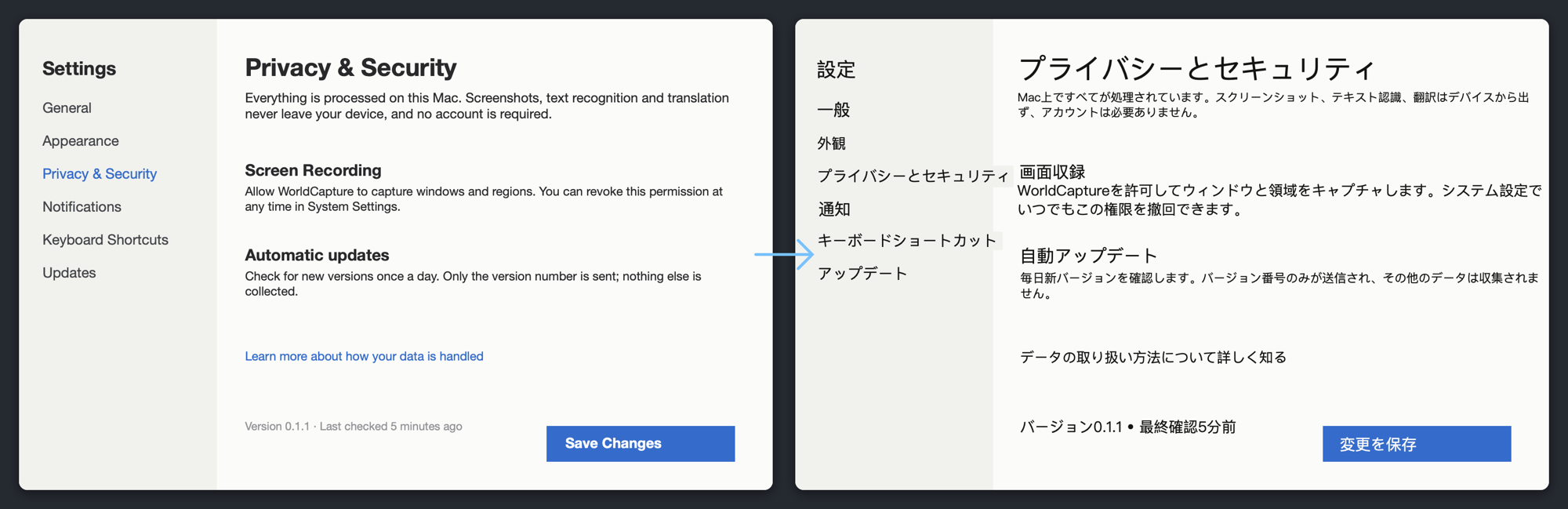
翻訳前 → 翻訳後。元の位置・サイズ・背景色のまま訳文を重ね、各ブロックは後から編集できます。
できること
- 画像を翻訳 — スクリーンショット内の文字を認識し、段落ごとに翻訳して元の位置に重ねます。
- 翻訳レンズ — 画面の範囲を選ぶと、字幕・コメント・更新される画面を継続的にその場で翻訳(クリックは透過)。
- テキスト抽出 — オンデバイス OCR。原文|訳文を並べて表示し、翻訳先の言語を選べます。
- キャプチャと録画 — 範囲・全画面・ウィンドウ・スクロールキャプチャ。画面/範囲/ウィンドウの録画、システム音声とマイク、GIF。
- 注釈とピン留め — 矩形、矢印、テキスト、番号、モザイク、フリーハンド、トリミング。クリック透過のピン留め。履歴ライブラリ。
- 翻訳エンジン — Apple Intelligence(オンデバイスモデル)またはシステム翻訳。どちらも通信しません。UI 用語集は自分で追加できます。
方針
すべて Mac の中で — スクリーンショット、録画、文字認識、翻訳はデバイスから出ません。
追跡なし — アカウント、計測、広告、透かし、いずれもありません。通信は任意のアップデート確認だけです。
オープンソースで検証可能 — MIT ライセンス。これらの約束はすべて自分で確かめられます。